Willkommen in der Transport Fever Community
Wir begrüßen euch in der Fan-Community zu den Spielen Transport Fever und Train Fever, den Wirtschaftssimulatoren von Urban Games. Die Community steht euch kostenlos zur Verfügung damit ihr euch über das Spiel austauschen und informieren könnt. Wir pflegen hier einen freundlichen und sachlichen Umgang untereinander und unser Team steht euch in allen Fragen gerne beiseite.
Die Registrierung und Nutzung ist selbstverständlich kostenlos.
Wir wünschen euch viel Spaß und hoffen auf rege Beteiligung.
Das Team der Transport-Fever Community
Sie betrachten gerade eine ältere Version des Eintrags. Klicken Sie hier, um zur aktuellen Version zu gelangen.
-
Since it has often happened that users do not know how to search files for file content, here is a small guide on how to do this with the free Notepad++.
So what steps do you need?
- Open Notepad++
- Press Ctrl+h (search window opens)
- Tab: "Find in files"
- Find what: "eatglobal_v2_26" (in this case)
- Filters: *.lua (this entry comes only in mod.lua), otherwise set a different file type. !This is important, otherwise it will search in ALL files and that will take a looong time!
- Directory: set modfolder or any other folder (i searched inside staging_area in that case)
- In all sub-folders: tick
- Search mode: Normal
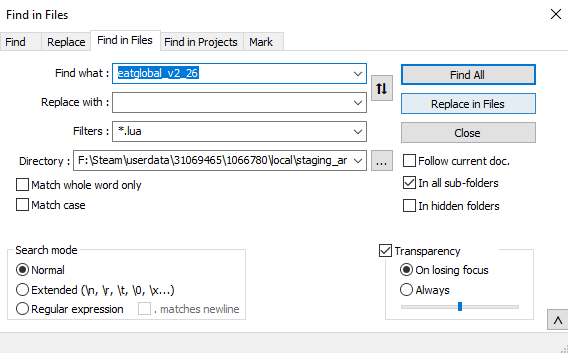
- Click on "Find all" and wait a moment. !Important, DO NOT click on "Replace in files", otherwise he will scrap all files where he finds the wording!
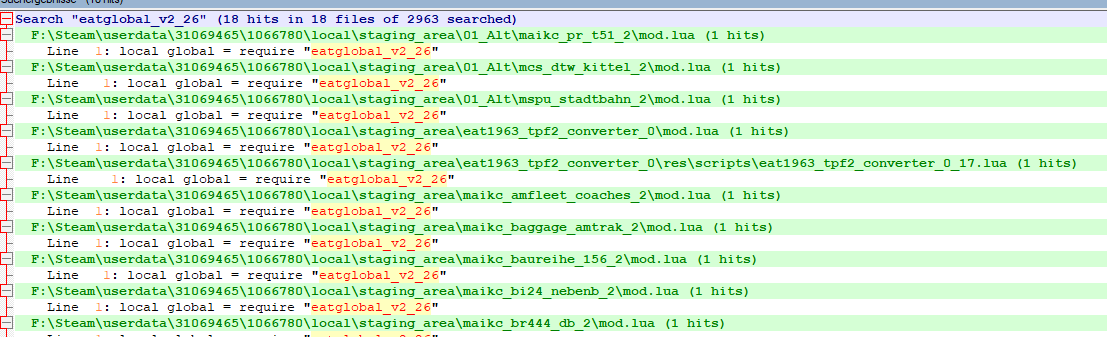
- The search results are displayed directly below, you can see the path and you can also open the files directly for editing.