

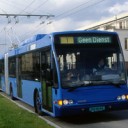
First draft of the Mesh for the 18m Solaris trollino.
Beiträge von berkhofsolaris
Willkommen in der Transport Fever Community
Wir begrüßen euch in der Fan-Community zu den Spielen Transport Fever und Train Fever, den Wirtschaftssimulatoren von Urban Games. Die Community steht euch kostenlos zur Verfügung damit ihr euch über das Spiel austauschen und informieren könnt. Wir pflegen hier einen freundlichen und sachlichen Umgang untereinander und unser Team steht euch in allen Fragen gerne beiseite.
Die Registrierung und Nutzung ist selbstverständlich kostenlos.
Wir wünschen euch viel Spaß und hoffen auf rege Beteiligung.
Das Team der Transport-Fever Community
-
-
Hello Bauer33333,
Thanks for your explanation it's now clear to me.
-
I'm trying to understand the code for the Solaris Urbino.I'm having troubles with understanding the code in the .mdl.
I already fixed it by using your code (hope you don't mind).
I added some extra lines in the .mdl for the doors and I think because of this the rear was out of sink.
For example according to the Wiki "
brakeLightsis a list of mesh ids which should only be used when the vehicle reduces speed."How do I know which mesh (number) I need to take?
btw. you have got 3 wrong lines in the .mdl file for animation of the passengers because you added the extra doors.
These are lines 435,436 and 437 not needed anymore (Solaris 18m Urbino).
-
Yes, finally, the 12m Solaris Trollino is ready.
Once I make the 18m and hopefully the 24m, than I will make some liveries.
-
Yes, finally, the 12m Solaris Trollino is ready.
Once I make the 18m and hopefully the 24m, than I will make some liveries.
-
Thanks guys,
That gave me a real headache, problem solved.
Because I already changed the mesh I tried MaikC solution and the "dirt" is gone:-P
Before:
After applying the solution:
And changing the cdr (for the colors):
Only thing to do is finishing the mesh and UV map.
-
Hello Marcolino,
So you didn't had the problem, but I have (please help me understand what I am doing wrong).
I know for sure I did push a button accidentally.
And because I tried the original mesh and gave the same problem, it's must be a problem with importing or exporting the mesh.
I followed the steps below:
- Copied the original file (solaris_urbino_iv_12_body.msh and the msh.blob) to an empty location with the converter.
- Using a converter called TPC_BR146.exe
- Changing the name in run.bat with Notepad++ so it would look like:
TFC_BR146.exe /make "solaris_urbino_iv_12_body" MESH OBJ /Z +Y /X -X /Y +Z - Executed run.bat
- Next it created the file and I imported it with .obj and the following settings.
- I turned the the mesh with R+X+180
- In object mode I applied "Rotation"
- I exported with Merk export tool with the following settings:
- I replaced the files with the in the game file
- I have a mesh which is to smooth but didn't change anything...
Could you tell me what your are doing different?
I spend a lot of time figuring this out and used for example google and this forum, but no luck...
-
You also made a different version of this Urbino (Solaris Urbino IV MVG).
Could you tell me if you also had the problem with the mesh which is to smooth?
- How did you solve this, because when I make the mesh flat instead of smooth it's ugly?
- And when you didn't had that problem, could you please explain how you imported and exported the mesh?
I keep having the same problem and don't know how to fix it...
Do you also maybe know the following:
- where can I edited that a face has the option to change color in the game?
Please see the picture below and than the green, I want the possibility to also change this in-game
Thanks again!
-
Wow looking great:-)
But I was wondering:
Did you solve the problem with the intersections for the overhead wires?Or do you planning solving this issue.
Don't want the presure you, but I got a lot of questions since I released the repainted trolleybuses.
Just need an answer so I can tell them.
Thanks!
-
Decided to give it a go myself.
WIP for the Trollino.
I will start with the 12m.
Than 18m and probably need some help for the 24m.
-
Hello Majuen,
So I'm trying to make the Solaris Urbino IV as a trolleybus.
One thing I adjusted was the pantographs, so it would fit perfect with your overhead wires.
Would you be so kind to let me know if you ever need to change that, because than I need to change the trolleybus also.
By the way: Did you solve the problem with the intersections for the overhead wires?
-
Oké thanks.
Than I will make the trolleybus a road vehicle.
I need it to turn the wheels and blink.
So @ this point a added a second UV-map for the trolleybus parts, seems to work perfect.
Also adjusted the pantograph so it fits perfect with the mod from Majuen.
But I still don't know why the mesh is to smooth.
I didn't change anything and the original mesh doesn't have this problem.
I have the same problem with the Solaris Urbino IV.
Also another picture of the front (earlier made)
-
New project, new trolleybuses.
it's still in the very early stages of the development, so please be patient, also waiting for the green light from the original author.
Also I am doubting if I want the extra trouble of making the bus a tram.
Why, you are asking?
I don't know how, already tried to change everything in the .mdl to rail and tram instead of road and bus.But the main reason is what I didn't like in the first repaints is: the wheels are not turning in the corner and the blink lights don't work eather.
When I leave it a bus, it works like it should be.
-
But you only have one overhead wire.
-
Hello,
That is a mod for Transport fever 1 and doesn't work in 2.
If you want a trolleystreet like I have, you need to follow the link I send earlier.
Otherwise it's not gonna work.
-
Hello franki66,
You could use this mod, be aware it is not finished.
-
Solaris production facility in Czech Republic
-
-
Hallo Traxx,
Het beste kan je checken waar je inwoners naar toe willen.
Dit kan doen door een willekeurige inwoner te selecteren.
Mogelijk heb je een omweg voor de inwoners in je lijnen, waardoor deze met de auto gaan.
Dus van stad A naar B, de autoweg gaat rechtstreeks, maar de trein/bus gaat van A via C naar B.
-
Oké, I Also live near the border but then in a city in Holland called Arnhem.
Therefor also my interest in trolleybuses:-)
But like the repaint of the tram from Rotterdam.


