-------[UEP2] _40d_---- 2022.01.22 ------ DONE
[uep2]_40d_international_port_(8_in_1)- -------- DONE
Release:(DONE)
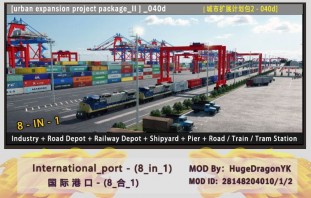
Download:
[uep2]_40d_international_port_(8_in_1)-
STEAM:
https://steamcommunity.com/sha…iledetails/?id=2727628529
--------------------------------------
-----Deutsche Sprache------
-----------------------------
!!__Bitte lesen sie die Mod Beschreibung als erstes!! Um die Funktionen des Mods zu verstehen und zu benutzen! :__!!
-----------------------------
Thanks to TarekInnit for the German translation. 
-----------------------------
urban_expansion_package_II
[uep2]_40d_international_port_(8_in_1)-
------------------------
Verfügbar in: 1950.
------------------------
[ - I - ].-------------------
Bevor sie den Mod laden!
(1). Der "Sandbox" MOD der mit dem Spiel kommt muss aktiviert werden um das Industrie Menü zu aktivieren!
(2). Sie können das Archiv benutzen um den Mod ohne Probleme direkt ins Spiel zu laden.
(3). Der Mod benutzt die standard Industrie-Kette und ist somit kompatibel mit den meisten Industrie-Mods(Mods die den Output verändern könnten nicht funktionieren)
(4). Es wird nicht empfohlen Mods zu nutzen die das Spiel an sich verändern! Mods die z.B. von hugedragonyk kommen oder auch andere Modder könnte somit nicht mehr funktionieren!
(5). Die Station gibt 5000-10000 Cargoplätze und wird sich dynamisch verändern. Alle Cargo-Stationen sind miteinander verbunden.
(6). Dieser Mod enthält 28 Strassen-Container lade-, entlade-Stationen, 3 Schienen-Stationen, 4 Importierte Auto lade-Stationen und 2 Docks
[ - II - ].-------------------
(1). Sie können diesen Mod unter dem Industrie-Menü finden
(2). Die erste Einstellung erlaubt Spielern die Industrie zu editieren, z.B. Industrie-Kette, Produkt-Typen und die Art wie es produziert wird ob direkt oder der Standard TPF2-Weg.Man kann aber auch die Industrie schliesen und die MOD dadurch nur als Station dienen lassen.
Die letzte Option ist der "Schwarze Loch Modus" In diesem Modus Spieler können Resourcen zu den Ports bringen und dennoch Fracht gewinnen.
(3). Die zweite Einstellung erlaubt Spielern, Anforderung von Gütern zu editieren. Der Standard-Ausgang der Industrie ist 1200. aber man kann den Slider bewegen um mehr oder weniger zu machen.
(4). Die dritte Einstellung erlaubt Spielern die Art der Fahrzeuge im Gebiet einzustellen. Man kann auch die eigenen Assets und den Platz der Fahrzeuge auswählen, so kann man seine eigenen Lieblingsfahrzeuge auswählen.
(5). Die vierte Einstellung erlaubt Spielern die Strasse und Schiene zu editieren. In dem simplen Modus, wird das Gebiet was eingenommen wird verkleinert werden was gut für die Spieler ist die Schönbau betreiben.
(6). Die fünfte Einstellung erlaubt Spielern die Art und Farbe der Strasse zu ändern, aufgeteilt in Stadt-Strassen und Außer-Stadt-Strassen
(7).Die sechste Einstellung erlaubt Spielern, die Strassenbahn-Strecken an oder auszumachen.Die Strassenbahn-Station ist ausgemacht wegen Kompabilitäts-Problemen, und wird wieder angemacht wenn das Problem gelöst ist.
(8). Die siebte Einstellung erlaubt Spielern die Art der Strassenbahn-Schienen zu verändern.
(9). Die achte Einstellung erlaubt Spielern die Elektrifizierung der Strassenbahn-Strecken zu ändern.
[ - III - ].-------------------
Mod-Assets:
(1). Sie können die Mod-Assets unter "Assets/urban_expansion_project_package_II" finden
[ - IV - ].-------------------
Notizen über den Mod:
(1). When sie den Mod nah an der Küste platzieren könnten sie die "nicht platzierbar" Aufforderung bekommen, nutzen sie die Rotier-Funktion um das zu umgehen.
(2). Bevor sie den Mod platzieren, stellen sie sicher das die Küste flach ist.
(3). Sie können mehrere Docks aneinander platzieren, die Schienen und Strassen werden sich automatisch verbinden und arbeiten.
(4). Sie sollten zuerst alle Einstellungen einstellen bevor sie den Mod platzieren.
-------------------------
----------ENGLISH-----------
-----------------------------
!!__Please read the MOD description first!! In order to understand the function of the MOD and use it correctly :__!!
-----------------------------
urban_expansion_package_II
[uep2]_40d_international_port_(8_in_1)-
----------------------------
available time: 1950
-----------------
[ - I - ].-------------------
Before loading the mod:
(1). The "Sandbox" MOD that comes with the game needs to be loaded to enable the "Industry" button.
(2). You can use the archive to directly load this MOD without any restrictions.
(3). The MOD adopts the default industry chain and is compatible with all industry expansion MODs. (Note! May not be compatible with some mods that modify the output level.).
(4). It is not recommended to use MODs that directly replace the default parameters of the game! ! Such mods will cause other authors' mods to fail to work properly! ! !
(5). MOD provides 5000-10000 cargo storage space, and will dynamically allocate cargo storage capacity for road/railway/shipping. All stations and cargo storages are connected to each other.
(6). MOD contains 28 road container loading and unloading stations, 3 railway container loading and unloading stations, 4 imported car loading stations (rail + road), and 2 docks.
[ - II - ].-------------------
MOD menu features:
(1). You can find this mod in "Industry/urban_expansion_project_package_II" option
(2). Setting 1, allows players to customize the industry chain and product type. You can choose to let the international port produce goods directly, or you can choose the default industrial chain production mode of the game.
At the same time, you can also close the industrial chain and let MOD only serve as a transit point for road/rail/ship transportation.
The last option of the mod is "Black Hole Mode". In this mode, players can transport excess resources to the port for consumption (simulating the export of cargos), while earning freight.
(3). Setting 2, allows players to customize the demand/output level of the industry. The default output is 1200, you can drag the slider to adjust between 400-4000.
(4). Setting 3, through this option, you can switch the vehicles in the three regions of "Asia", "Europe" and "America". You can also choose to close the assets and place your favorite vehicles.
(5). Setting 4, this option allows you to adjust the road and railway settings of the port. In the simplified mode, the area occupied by the port can be reduced, which is convenient for players to design road connections by themselves.
(6). Setting 5, you can customize the appearance of roads, divided into urban roads and suburban roads.
(7). Setting 6, you can turn the tramway on or off. (Due to the compatibility setting problem, the tram freight station is temporarily removed from the current version (V1.1). After the problem is solved, it will be re-added in the next version update.)
(8). Setting 7, you can customize the railway type. Defaults to normal rail with wooden sleepers.
(9). Setting 8, you can customize the electrification of the railway (if you choose electrified railway, the railway catenary will not be displayed in the container loading area.).
[ - III - ].-------------------
assets:
(1). You can find the mod's assets in the "Assets/urban_expansion_project_package_II" option.
[ - IV - ].-------------------
MOD related notes:
(1). When you place the mod on the shore, you may encounter a "conflict" or "unable to build" prompt. Use the "M" and "N" keys to rotate the mod.
(2). Before placing the MOD, it is recommended to level the river bank/coast first, and use the "," and "." keys to adjust the height of the MOD (the junction of brick-cement in the port should be level with the water surface.).
(3). You can connect multiple international ports in series to form a larger port. When two ports are close to each other, roads/railways will automatically connect to each other.
(4). It is recommended to set all MOD menu functions first, and then place the MOD.
-------------------------
have fun~









 . . .
. . .