Beiträge von Gwinda

Willkommen in der Transport Fever Community

Wir begrüßen euch in der Fan-Community zu den Spielen Transport Fever und Train Fever, den Wirtschaftssimulatoren von Urban Games. Die Community steht euch kostenlos zur Verfügung damit ihr euch über das Spiel austauschen und informieren könnt. Wir pflegen hier einen freundlichen und sachlichen Umgang untereinander und unser Team steht euch in allen Fragen gerne beiseite.


Die Registrierung und Nutzung ist selbstverständlich kostenlos.


Wir wünschen euch viel Spaß und hoffen auf rege Beteiligung.

Das Team der Transport-Fever Community


    New version 1.2.0.90 - 1307


    * Added path to an external Lua editor for editing configuration files.
    * Added a Mod configuration option to toolbar and popup menu.
    * Fixed a division by 0 error in the tag color class.
    * Fixed a bug where the info.lua files was case sensitive.
    * Fixed some tag description formatting issues (missing spaces)
    * Fix. Selected modules stays selected after enable/disable etc...
    * Fixed Steam profile link not working from Translator author cards

    ORUMS
    Train-Fever.com
    Steam


    DOWNLOAD
    The mod can be downloaded from:
    Train-Fever.net
    DropBox


    REQUIREMENTS
    Train Fever 6219 or above.


    PLATFORMS
    Windows
    Mac
    Linux


    DESCRIPTION
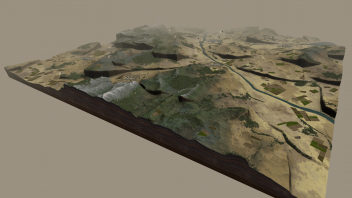
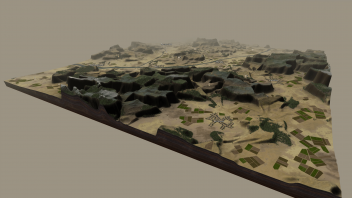
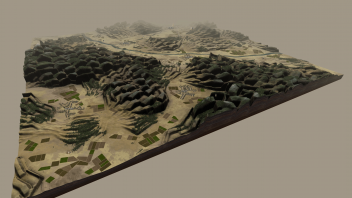
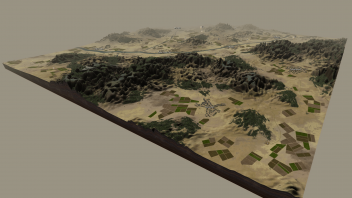
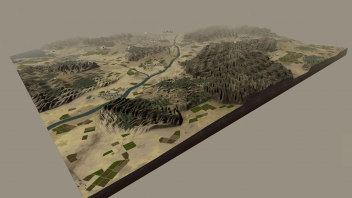
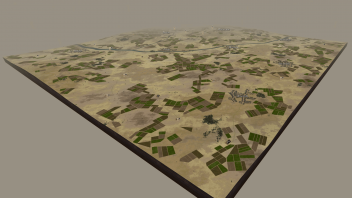
    Gives you control over various map related parameters.


    Control:
    • 6 new terrain generators
    • Forest size and density
    • Town initial size and growth rate
    • Industry size and max production
    • Main connections on/off
    • Rocks on/off


    Supports TFGM's configuration UI.


    INSTALL
    The map mod is written for the new mod system and must not be copied into the res folder, as before.


    Manual install
    Unzip the archive in Train Fever/mods/ folder.
    Start TF and activate the mod before playing.


    TFGM install
    Drag & drop the archive to TFGM.
    Enable the mod
    Start TF and activate the mod before playing.


    UNINSTALL
    The good news with the new mod system is that no files are being modified. This makes it easy and safe to remove the mod at any time.


    Manual uninstall
    Simply delete the the Train Fever/mods/gwinda_map_mod_x folder where x is the mod's major version number.


    TFGM uninstall
    Simply select the mod and press disable.
    The mod is kept in TFGM's internal library and can be enabled again at any time. To completely remove it from library select the mod and press uninstall.


    CONFIGURATION
    The easiest way is to use TFGM's built ini Configuration UI. Install the mod and go to the configuration tab.


    [Blockierte Grafik: https://www.train-fever.net/index.php/Attachment/50639/]


    To manually configure (without TFGM)
    The configuration file is located in the mod's root folder under Config/config.lua
    You can either manually open it in a text editor or just from TFGM, right click on the mod and select "Mod configuration..."


    The config file has instructions included at the top. Scroll down to:


    "-- BEGIN -- Do your configuration here"


    Save create a new game to see the mod params take effect (no need to restart Train Fever).


    NOTE!
    The mods map data is only used when generating new games. It is not possible to add more forests to an already saved game.

    When TFGM download updates it uses SSL (HTTPS). Some Windows installations you need to have one or more DLLs for the SSL part. These DLLs are bundled in the TFGM archive, just in case, and can be downloaded separat on the TFGM page here on Train-Fever.net


    You can always upgrade TFGM manually by downloading it from here
    Train Fever Game Manager
    ..and then just replace all the old TFGM files with the Archive content.


    I remember that I released a few versions quickly in a row due to crashes I found.
    Let me know If you find more problems after you have updated to the latest version.

    1.1.1.85 - 1302
    Version 1.1


    * Temporarily removed the repair option.
    It was only checking the legacy format. Needs to be rewritten.
    * Added a tag preview in tag manager.
    * Added a colour editor to the tag manager.
    Now you can set your own colors on the tags.
    * Create and Add new tags directly from the Mod's information panel.
    * Auto naming when exporting tags by languages.
    Edit manually to break auto naming and clear the name to enable it again.
    * Added auto named tag file exported (selected languages).
    * Added more links under the help menu.
    * Added progress bar when scanning for modules.
    * Added confirmation dialog after tag export.
    * Added an auto clear option to the log window (auto clears when TF starts)
    * Added Select all to log window.
    * Added Find dialog to log window.
    * More intelligent mod import from non standard formats.
    * Better Lua error messages.


    * Fixed a bug where search with empty strings always returned match.
    * Fixed a bug where tags sometimes where exported under the wrong file name.
    * Fixed the group on status view mode.
    * Fixed a bug where all flags (mod's info page) was shown if a mod didn't have any strings defined at all.
    * Fixed a potential crash when TFGM closed after TF had been closed manually.

    Version 4.0 released!
    You can now add a filter if you only want to play with Steam, Diesel, Electric or horse powered Trams adn trains. See description and config file for more info.

    VERSION 1.0!
    I guess this is as good as any to make a 1.0 release.


    * A tag manager has been added
    * translate tags.
    * Edit tags.
    * Add customized tags.
    * Delete tags.
    * Export tags.
    * Import tags.
    * Both simplified and traditional Chinese added tot he language list.
    * Import tags by drag & drop.


    More minor fixes for robustness.

    Dear community!
    I'm in need of help with translation of tags from English to the following Languages:


    Čeština
    Español
    Français
    한국어
    Magyar
    Italiano
    日本語
    Norsk
    Polski
    汉语 (done)


    If you can or know someone willing to translate about 50 words, please contact me.

    Well, I don't speak Russian but Google translate gave me a hint.
    Mods already installed, or installed manually can be imported to TFGM by hitting the repair button (file->Repair) and scan button (File->Scan installed mods).
    If this doesn't work, can you please send me a link to a mod that doesn't work for you.

    New version: 0.95.1.78 - 1292


    * Fixed screwed up settings file after TF setting edit
    * Fixed the baseline creation even if selected no
    * Fixed the language population always selecting English.
    * Fixed default update check time to 4 hours.
    * Fixed the NameID bug (not finding the correct fallback language)
    * Added the new "VehicleLifetimeNotification" setting
    * Added some missing hint text
    * Splash showing missing updater

    Thank you for the info.


    It is correct, the TF launch buttons in TFGM doesn't work on all Windows 8 systems. You don't need to launch TF from TFGM in order to make the mods to work. You can start TF from your Steam client as usual.
    However, it sounds strange that you had to delete teh settings.lua in order to make it work. I will look into it.