

Yes scaling ruins textures. I always deal with obtuse Textures when scaling the Building Blocks Mod pieces.
Beiträge von N0neGiv3N
Willkommen in der Transport Fever Community
Wir begrüßen euch in der Fan-Community zu den Spielen Transport Fever und Train Fever, den Wirtschaftssimulatoren von Urban Games. Die Community steht euch kostenlos zur Verfügung damit ihr euch über das Spiel austauschen und informieren könnt. Wir pflegen hier einen freundlichen und sachlichen Umgang untereinander und unser Team steht euch in allen Fragen gerne beiseite.
Die Registrierung und Nutzung ist selbstverständlich kostenlos.
Wir wünschen euch viel Spaß und hoffen auf rege Beteiligung.
Das Team der Transport-Fever Community
-
-
 Alles anzeigen
And there it is... Now you can fly on your own maps.
Have fun with it:
Externer Inhalt youtu.beInhalte von externen Seiten werden ohne Ihre Zustimmung nicht automatisch geladen und angezeigt.Durch die Aktivierung der externen Inhalte erklären Sie sich damit einverstanden, dass personenbezogene Daten an Drittplattformen übermittelt werden. Mehr Informationen dazu haben wir in unserer Datenschutzerklärung zur Verfügung gestellt.Ps: Big thanks to Weisssi for the support
This is really amazing man!
-
Check your Track Speed limits by pressing NumPad 4.
-
-So I really can't understand why people copy mods from the Steam or Mod.io directory to another and manage them themselves.
I can think of a reason.
There are a ton of mods out in the wild that do great things. Some of them could do things differently or maybe a little more of what was already done. Backing the mod up manually allows a user to tinker with the mod without fearing for the original Modder releasing an update and essentially erasing all of the manual edits they have made. If it's backed up, the user can periodically check for updates and incorporate them on their own time without erasing their edits.
Back on Topic; didn't the Contest Submissions end yesterday? Today is the 11th of April; I thought contest entries ended on the 10th?
-
The information below comes from Reddit user Forkboy2.
ZitatAlles anzeigenOpen up C:\Steam\steamapps\common\Transport Fever 2\res\config\base_config.lua with a text editor and look for the lines at the end that looks like this:
{ viewNearFar = { 4.0, 20000.0 }, fogStartEndFarPerc = { .20, 1.0 }, lodDistanceScaling = .80 }, -- High
Increase the number I have shown as 20000 above. The larger the number, the farther you'll be able to zoom out.
The fogStartEndFarparc controls distance before fog appears.
The lodDistanceScaling controls how far out fine details such as cars and trees are visible.
Below are the values I use, might be a good place to start.
Low is used when Geometry is set to Low, etc.
This will let you zoom out and see a huge area on high and with CameraTool
{ viewNearFar = { 4.0, 6000.0 }, fogStartEndFarPerc = { .60, 1.0 }, lodDistanceScaling = .40 }, -- Low
{ viewNearFar = { 4.0, 10000.0 }, fogStartEndFarPerc = { .40, 1.0 }, lodDistanceScaling = .60 }, -- Medium
{ viewNearFar = { 4.0, 20000.0 }, fogStartEndFarPerc = { .20, 1.0 }, lodDistanceScaling = .80 }, -- High
{ viewNearFar = { 4.0, 350000 }, fogStartEndFarPerc = { .10, 1.0 }, lodDistanceScaling = 10 }, -- Camera tool
This is a "Huge" sized map example.
-
No. What I do as an alternative is use tracks that do not have third rails attached to them or overhead lines for modular stations. I then use asset versions of third rails and place them on the tracks myself.
-

Can't wait to ship out some Freight!

-

The annoying croaking frog is not from UG, but a sound in the Environment Pack on Steam

That's good to know. Now we can all go to that folder and delete that .WAV
-
Watching the (11) Train depart 9th Avenue Station with the (1) Train roaring past underneath.
Externer Inhalt youtube.comInhalte von externen Seiten werden ohne Ihre Zustimmung nicht automatisch geladen und angezeigt.Durch die Aktivierung der externen Inhalte erklären Sie sich damit einverstanden, dass personenbezogene Daten an Drittplattformen übermittelt werden. Mehr Informationen dazu haben wir in unserer Datenschutzerklärung zur Verfügung gestellt. -
...only on mod.io? Then I'm out.
One could always release on Mod.io during the Contest Period and then as soon as the period is over, release the mod on Tpf.net and Steam if you'd like.
You only have to follow the guidelines of the contest while it's active.
-
Use the Population Factor and Town Tuning Mods from Steam Workshop.
-
I may have some lower bridges or culverts in the area. I will review the affected areas for any bridges.
I tried to review the bounding box layer but it didn't make much sense to me. It didn't look like anything was out of the ordinary.
Edit: So I did another look into this. I'm getting these strange artifacts even in an area that only has an elevated Freestyle station placed and nothing (Not even roads or buildings) are located next to it. I did customize it with building blocks but those assets do not have collision so it shouldn't be an issue. If there isn't a fix for it, I'll just live with it.
-

I'll upload it to the gallery then. I thought people were just adding it here.
Edit: Added it to gallery with the appropriate tag.
-
Tunnels? I will kick us off then!
Looking at the Upper Level of the Wotton Av Subway Station from the East Bound Local Track that cuts through Wotton Av Underground Yard (Upper Level).
This station is served by the (2),(4), (9), (B), and the Strangford Shuttle Trains.
Access the Lower Level Yard Tracks via the Middle Track!
-
No; you will have to change the wait times manually one by one in the Line Manager menu for each station.
-
This topic can be closed.
It turns out this was due to a Memory Leak issue after having my Computer turned on for several days without a restart.
Upon a fresh restart, this error is history.
-
You wanted to adjust the scaling and that's what you got in return.
- The Height was adjusted therefore it was displaced vertically.
- The Width was adjusted, therefore it was displaced horizontally.
There is nothing else to explain really. The object does not have its original position as an anchor when increasing the scale if that is what you are truly wondering.
-
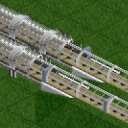
but only changes the render distance. The movement of the camera cannot be changed.
Sorry to resurrect an old topic, but what settings do I have to change to make it so the camera tool can render its edges closer?
-
One last ditch effort would be to go into options and disable debug mode and then re-enable it. That might cause it's menu displacement to get reset to default. I notice the Debug Menu always opens up on the left side of the screen so this should return it there.
If that doesn't work. I'm not sure if there is another method outside of just reloading your save which might take you a long time depending on how developed your world is.
-
Try going into Camera Tool and then do Alt+D. The window for Debug Menu should reset back to its original position.


