In my SweDen mod for TpF1: I divided the search into several parts because it is not in a hurry to find a new industry. It is actually so that a newly placed industry does not have to start its production in the first few seconds. I have thought of this to just distribute the job so that it does not become too high a momentary load. Now that the starting point is to use SIM_BUILDING, the final result with a distributed job will be even better. As you wrote bulldozing is the only situation where something is changing fast. This has to be handled in the script.
The player (sandbox mode) or game start can place warehouses all over the map, so there may be more than one "warehouse industry".
use print(toString(mytable))
I have also initiated an area in the GUI, so I can see the values in game.
This is the problem that I often get. Printing the variable in the console or directly in the code givs me only an info that it is a table, but how to get into the table, what names are hiding inside it besides "_sum"? I have tested to index the table [1] ... ,but that results only in a nil value.
The code I found in the UG campaign was:
game.interface.getEntity(game.interface.getEntity(params.glasgow_steelmill).simBuildings[1]).itemsConsumed
I changed the params.glasgow_steelmill into the Entity id for the industry I have and the result (table) is seen in the screendump.

A table that includes something, but what?
After I installed your Adv. Stat mod I found that you are using the same type of code, but you have "._sum" at the end .... So I placed the ._sum behind "itemsConsumed" in my code and it resulted in this:
 local Consumed= game.interface.getEntity(game.interface.getEntity(ConId).simBuildings[1]).itemsConsumed._sum
The Consumed value (258) is not the same as the consumed value for the industry = 165, but it show at least something!
(The ConId 27553 is the entity id for the Industry from which I have to get the data)
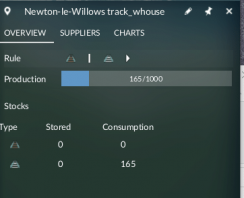
In this industry there are two input items and each have a consumption value, I think the ._sum is the sum of both. How to get consumption value separately for each item ( in the example above it should result in 0 and 165)?