Beiträge von melectro

Willkommen in der Transport Fever Community

Wir begrüßen euch in der Fan-Community zu den Spielen Transport Fever und Train Fever, den Wirtschaftssimulatoren von Urban Games. Die Community steht euch kostenlos zur Verfügung damit ihr euch über das Spiel austauschen und informieren könnt. Wir pflegen hier einen freundlichen und sachlichen Umgang untereinander und unser Team steht euch in allen Fragen gerne beiseite.


Die Registrierung und Nutzung ist selbstverständlich kostenlos.


Wir wünschen euch viel Spaß und hoffen auf rege Beteiligung.

Das Team der Transport-Fever Community


    I read earlier in this thread that soundset has some problems.


    I have been testing a simple soundset to run in background when close to my new harbour. I can get sound when using following line in soundset config file:


    "random 8" will trigger the sound about 8 seconds, but if this value is changed to 5, 6, 7, 9, 10, 11, 12, 13 there will never be a sound in my case.


    Is this a bug or do I have to do something else?

    Here is my next strange question....


    I have a harbour that now works like an industry (note it isn't built as an industry, it is built from the harbour menu). It processes input and makes an output. If the output is the same as the input of another nearby industry. The cargo is to be transported even if it is a very short distance, due to the game. To solve this short transport distance of the processed output harbour cargo to the nearby industry without forcing the player to make a short line,

    I am now thinking (if possible) to make a construction which has two invisible stations and a script created invisible vehicle that moves the cargo inside the area of the harbour, This will have the effect when the script created vehicle unloads the cargo at the internal station 2, it will be same as if the player have built a short line manually externally.


    So, can a script create a line between two stations and "buy" a vehicle and put it into this line automatically?

    Nobody has had this problem before

    I'm sorry but I can not understand the basic idea of not updating the animation files after making changes to them. I equate this with changing the mesh files so these files are automatically updated, why not do the same with animations?

    Hello,


    Every time I have to convert a mod including animations I must delete the fwd and bwd .ani files in the 'models/animation/...' folder by using windows explorer else they are not updated if changes where made in the animation. It would be nice to get the converter to remove the old .ani files automatically. This has caused me troubleshooting for hours before I remember that the ani files must be manually removed.

    The api isn't ready for that.

    So, if there isn't a chance to find the place in the data table where I thought to be "rough" to just change the value, I only have the solution to lower the stock in height to hide the cargo at the industry,:(. It will also have the negative effect that this mod will not be compatible with other mods including FISH.
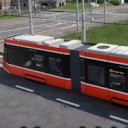

    The second limitation that I often get into is to trigger animations upon events from other mods e.g. vehicles. In my running project I wish to open the gate at the industry when a train is arriving. I had the idea to integrate a railroad crossing, but as usual it seems not to be possible. If UG had taken the startEvent function from TpF1 into TpF2 I would be a very happy guy, but unfortunately TpF2 will not have that function.:(:(

    addModifier

    ?

    I think I don't understand your post.


    I have seen that if I make a change on the FISH indicator (cargo in res/config/cargo_types) on one of the models it will automatically change the the look for the second mod (if both mods uses "FISH") depending on loading order at game start. That's why I have the idea of two different cargo types, but somewhere between the producer and the industry it must be switched from one type to the other, else the game uses the same cargo on both places and that will have the unwanted indicator in one of the places.

    I'm trying to find out if it is possible to change the type of cargo type when cargo is unloaded into receiving industry.


    I have a producer of eg. "fish_b" and here I have made a custom indicator that fits only in this producer area. When the fish is loaded on to a boat it will make a mess on the load indicator, so that's why I have found and uses the "customCargoModels" in the vehicle compartment as vehicles can have other indicator models


    Now I come to the problem. When delivering at an industry I get the original cargo and here I have the unwanted indicator in the visible stock layout.

    My idea to get the same indicator as I have on the boat, it could be to just find the cargo components in the entities and change the cargoType number. It would be possible to let the "producer industry" create "fish_b" to be transported to an industry that may receive either "fish" or "fish_b" to produces food. I have found that the cargo type for fish has got the value of 16 and "fish_b" is 17 in my test environment.


    But how do I find each component at the industry stock? and when found how to change the value? I have read the WIKI and got some updated info from UG about SimEntityAtStock

    1. I have written a script so I'm searching for constructions with it's name equal to my industry and can find all id:s but I'm stuck to continue to find the cargo type at the industry stock.

    Hi


    I'm creating a logic in a con file in which I need to know the previous production level that was set by user or AI.

    As global values are not allowed, how to get a place to store a value in the con file to be read next time it executes in the updateFn?

    Mod-converter also makes *.ani

    Yes (I'm using it) and the converter takes the data from the mesh (Tpf1) and converts what it has to .ani file. As long as the export tool (in Blender) doesn't export scale, there will never be any scale info at the end.

    As I have a lot of mods that I whish to make public in TpF2 version and at the same time make some upgrades, there would be good to have the scale exported from Blender into .ani file directly. As I have built the old mods with more materials per mesh, I think FBX export will not work without a lot of work on the mods.

    I found the root cause. This was due to the fact that Blender had a setting that made animations accelerate at the start. TpF does not have this function, which made me experience a difference. When one of the animations was adjusted in the time scale, this was done in the non-linear acceleration phase with the result that my changes were not perceived to follow my own calculation. Blender has now been adjusted to Linear Extrapolation in the animation editor.


    Problem solved