Beiträge von melectro

Willkommen in der Transport Fever Community

Wir begrüßen euch in der Fan-Community zu den Spielen Transport Fever und Train Fever, den Wirtschaftssimulatoren von Urban Games. Die Community steht euch kostenlos zur Verfügung damit ihr euch über das Spiel austauschen und informieren könnt. Wir pflegen hier einen freundlichen und sachlichen Umgang untereinander und unser Team steht euch in allen Fragen gerne beiseite.


Die Registrierung und Nutzung ist selbstverständlich kostenlos.


Wir wünschen euch viel Spaß und hoffen auf rege Beteiligung.

Das Team der Transport-Fever Community


    Here is a small sample of my work, done today. There is still a huge part to create, for instance turning the lod 180° outside the harbour before arrival.


    Right know I have discovered that the Bounding box parameter do not have any effect on the ship position in the harbour when I manually edit the values.


    boundingInfo = {
    bbMax = { 55.0, 13.0, 31.0, },
    bbMin = { -100.0, -13.0, -5.0, },
    },

    Both 13.0 meters are changed to +-18.0 but the ship is still smashing on the same place into the harbour....


    More to come....

    Progress report:


    I'm continuing with animations and I have now a working door opening in Blender. The Delta rotation is configured to turn around the y axis, but in the game and model viewer

    • the loading ramp is turning around the X axis
    • and the fence on the loading ramp turns around the Z axis!

    These both meshes are configured in one animation. I have tested two calls, open_all_doors and open left_door, it makes no difference on door opening.
    For information I have a second animation that is working 100% and it is a forever turning radar animation in Z axis.


    Please help, I'm so confused.


    Cut from the mdl. file

    events = {
    close_doors_left = {
    [14] = {
    forward = false,
    name = "Fence_rampAction",
    },
    [21] = {
    forward = false,
    name = "LastrampAction",
    },
    },
    forever = {
    [18] = {
    forward = true,
    name = "FrontMast",
    },
    [30] = {
    forward = false,
    name = "RadarsmallAction",
    },
    },
    open_doors_left = {
    [14] = {
    forward = true,
    name = "Fence_rampAction",
    },
    [21] = {
    forward = true,
    name = "LastrampAction",
    },
    },


    Cut from one of the faulty msh files:

    Fence_rampAction = {
    params = {
    keyframes = {
    {
    rot = { 0.0, 0.0, 0.0, },
    time = 0.0,
    transl = { 0.0, 0.0, 0.0, },
    }, {
    rot = { 0.0, -90.0, 0.0, },
    time = 14400.0,
    transl = { 0.0, 0.0, 0.0, },
    },
    },
    origin = { 0.0, 0.0, 0.0, },
    },
    type = "KEYFRAME",
    },


    Hello again


    After a couples of hours I have fixed almost all texture errors, but there is one place that will not make the change to the better. These darker/brighter areas are also showing through the texture in the game.


    An area is filled with slightly darker faces. I have tried to delete only the faces and secondly also the edges to fill this area with one ngon, seen in image 1. The ngon has one color but after triangulating faces the sub faces do not have the same color any longer.


    It seems that Blender is copying the color of the nearby face (outside the ngon). I have also tried to refill these areas but they will always be filled with the same color as before.


    How can these solid face colors be forced into the same intensity?
    (This is probably what WiZz4Rd wrote, but I don't find the way in Blender.)


    image 1, ngon/ image 2, triangulated faces

    You have guessed very good. The ferry has 59 000 tris and the lifeboat 3500 tris. As the ferry will travel mostly on the sea (alone) and not in a city center I think this huge object will probably work on even slower computers, though I have a pretty powerful system.
    In the mdl file I will use the parameter visible (from /to) to reduce the load for the graphic card. At far distance I will disable the smaller details and that can be done easily with the configuration I have right now.


    But still there is a "bad" color on some parts of the ship. The biggest visible area is seen on the lifeboat as shown in the first image. Do you have an idea to solve this?

    Ich starte hier ein Thema mit dem Inhalt meiner Arbeit, (die Fähre Stena Line). Ich werde weiterhin in English schreiben, aber Sie können gern in Deutsch antworten. Ich verstehe beide sprachen, aber ich finde English is einfacher im Schrift.


    I've been modelling for a couple of months with the Stena Ferry. While working I'm also learning, and yes I'm a newbie with Blender. My intension is to create a one mission campaign with a map of the west coast of Sweden including north of Denmark. The map is almost finished, and on this map there will be a fishing boat to collect fish and a passenger ferry to be used between Denmark and Sweden.


    So let's get to work...


    I have often got trouble with surfaces in Blender. When I need to insert new faces or make changes on the mesh I get different colours on the faces. These colors are showing through the texture when the object is visible in the game, please note *1 in Blender screen shot below.

    • Can someone explain how I can get a specific color and fix these details? (Texture painting in Blender is not working)


    I got the comment from (MaikC) that this mod should be sufficient with 2-3 lods. I have more then 10 lods (children) to get this ferry and here are some of them: Ships hull, loading ramp (animation), radar (animation), 4 pcs lifeboat (linked obj), speedboat, 10 pcs life boat cranes (linked), chimney, window.


    • What is the limitation (amount of lod) for good practice to use in one object?
    • What is the best selection between,

      • many lods with small sized texture maps or,
      • few lods with big texture map?

    In my project I have selected the image size of 4096 x 2048 for the ship hull and it is almost to small. The other details are using 512 x 512 up to 1024 x 1024.


    /melectro


    Ja das kenne ich, aber ich habe einige lods und jedes mahl dass ich ein export durchführe muss ich auch viele .mtl Datei manuell editieren. Es gibt noch viel zu tun...

    Im Datei tf_mesh_mdl.py (export plugin vom Merk) finde ich diesen Satz:


    for j in range(len(material_data[i])):
    if 'two_sided' in material_data[i][j]['params']:
    twoSided = material_data[i][j]['params']['two_sided']['twoSided']
    else:
    twoSided = False
    k = bpy.data.materials.find(material_data[i][j]['name'])
    if k >= 0 and bpy.data.materials[k].diffuse_intensity == 1.0:
    newmaterial = bpy.data.materials[k]
    if j == matConfig[i]:
    for tex_type in texturetypes[material_data[i][j]['type']]:
    if tex_type == 'map_color_reflect':
    for tex in newmaterial.texture_slots:
    if tex != None and 'map_color_reflect' in tex.name:
    material_diffuse_image = tex.texture.image
    elif tex_type == 'map_color_alpha':
    for tex in newmaterial.texture_slots:
    if tex != None and 'map_color_alpha' in tex.name:
    material_diffuse_image = tex.texture.image
    elif tex_type == 'map_color':
    for tex in newmaterial.texture_slots:
    if tex != None and 'map_color' in tex.name:
    material_diffuse_image = tex.texture.image


    Ich weiss aber nicht wo ich die params schreiben soll.

    Normalmaps (mit den Strukturen) werden nur auf der "Sonnenseite" des Modells geladen, die anderen Seiten müssen ohne auskommen. Das ist in der Engine so.
    twoSided bedeutet, dass man das Material von beiden Seiten sieht, z.B. damit man die gegenüberliegenden Türen sieht wenn eine Seite offen ist, die wären mit twoSided=false durchsichtig da nur von aussen zu sehen.

    Wo finde ich dieser "two_side" parameter in Blender 2.78?

    Hallo zusammen


    Ich versuche, mein Objekt um 90 Grad in Blender zu drehen, damit es richtig in den TPF behandelt werden. Ich kann es nicht verstehen, warum das Objekt sichtlich sich dreht im Blender Modell, aber ins Spiel keine Auswirkungen gibt. Muss man in jeder "children" fast alle transf parameter ändern?
    Es wurde sehr einfach ob ich nur eine rotation machen konten, aber leider drehen sich die Objekten falsch gegen einander und kommen dann auch auf falscher position. Kann jemanden mir ein tip geben, wie kann ich ein ganzes Object mit viele lods in Blender drehen?


    Hier ein Teil vom .mdl (rot markiert is die grösse und diese nummern finde ich in Transform einstellung bei jeder "children"


    {
    id = "vehicle/train/Jutlandica/flag.msh",
    transf = {
    0.20188, 0.0, 0.0, 0.0, -0.0, 0.20188, 0.0, 0.0, 0.0, 0.0, 0.20188, 0.0, 2.55964, -18.00965, -3.039, 1.0,
    },
    type = "MESH",
    },
    {
    id = "vehicle/train/Jutlandica/Front_light.msh",
    transf = {
    0.20188, 0.0, 0.0, 0.0, -0.0, 0.20188, 0.0, 0.0, 0.0, 0.0, 0.20188, 0.0, 11.7126, -18.00965, -3.039, 1.0,
    },
    type = "MESH",
    },
    {
    id = "vehicle/train/Jutlandica/Front_mast.msh",
    transf = {
    0.20188, 0.0, 0.0, 0.0, -0.0, 0.20188, 0.0, 0.0, 0.0, 0.0, 0.20188, 0.0, 2.55964, -18.00965, -3.039, 1.0,
    },
    type = "MESH",
    },
    {
    id = "vehicle/train/Jutlandica/Front_mast_radar.msh",
    transf = {
    0.20188, 0.0, 0.0, 0.0, -0.0, 0.20188, 0.0, 0.0, 0.0, 0.0, 0.20188, 0.0, 2.55964, -18.00965, -3.039, 1.0,
    },
    type = "MESH",
    },


    Im modell und lod gibt es auch Transform parameter aber es hat keine wirkung ins Spiel. (rot markierung im Bild)
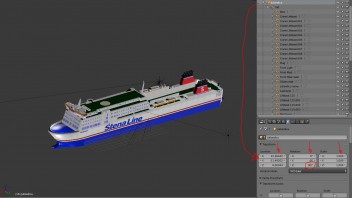

    Im Children (Beispiel: flag) bekomme ich die Transform parameter in mdl Datei. Größe stimmt mit dem Inhalt des mdl Datei, aber "location" X Y Z sind nicht zu finden.
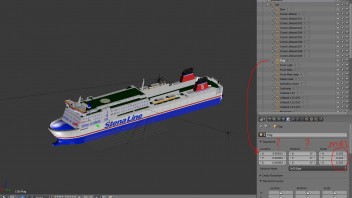

    /melectro

    Ich studiere modding und bin jetzt an glas material. Ich nehme ein Kopie vom orginal des Tram ordners und benutze "glas.mtl" . Ich will später das Glas ändern (dunkler machen) und öffne beispielsweise textur datei "glass_normal.dds" mit GIMP, ohne was zu ändern möchte ich die Datei zuerst nur neu speichern. Dann geht es aber schief, beim Spiel laden bekomme ich ein crash.


    Wo kan man das Wahl von der Komprimierung (DXT.?.) in ein .dds datei auslesen?


    error code from game crash:


    texture load error: file name without extension: res/textures/
    c:\build\transport_fever\steam\transport_fever_release\src\lib\renderer\tex_load.cpp:1201: int __cdecl tex_load::LoadDds(const class FileSystem *,const class std::basic_string<char,struct std::char_traits<char>,class std::allocator<char> > &,unsigned int,bool,bool,bool,bool,int *,int *,int *): Assertion `mipmaps == (texture.levels() > 1)' failed.

    Feedback:


    I have managed to get the sound work as it should.


    Thank you again for your excellent explanation. I find it so good that it should actually be a part of the Lexicon.


    /melectro

    Danke! Ich habe einige Drehungen mit 90° versucht aber nicht die Spiegelung. Es funktioniert!


    Weißt Du ob es überhaupt geht eine dynamische Ladung am schiff zu bekommen? Es gibt viele Beispiele mit Lastwagen und waggons, aber UG hat kein Schiff mit sichtbare Ladung.


    Ausschnitt von mein Script Datei:


    transportVehicle = {
    capacities = {
    {
    type = "FOOD",
    capacity = 440,
    loadIndicators = {
    {
    params = {

    levels = {
    { 1, 2, 3, 4, 5, 6,},
    { 1, 2, 3, 4, 5,},
    { 1, 2, 3, 4,},
    { 1, 2, 3,},
    { 1, 2,},
    { 1,},
    { },
    }
    },
    type = "DISCRETE",

    Hallo alle modders


    Ich versuche es in deutsch zu schreiben. I hoffe Sie können es verstehen und dann auch erklären.
    Ich arbeite seit einige Wochen mit ein neuen mod. Ich baue ein Fischer boot, mit Ladung am deck. Leider bringe ich die Ladung nicht zum funktionieren. Die Fischer Behälter sind immer da auch wenn das Schiff lehr ist. Ich habe die scripts kopiert als ausgangs modell von die original boote von UG (Viola, Schaffhausen u.z.w.)
    Ich habe verschiedene versionen getestet und habe entdeckt ein zweites Fragezeichen und um diese geht meine Frage jetzt.


    Sie sehen den .mtl script unten (Materialien für die Fischer Behälter), Der Textur Datei habe ich in GIMP gemacht und von dort es exportiert ins ".tga" und dann auch in ".dds" BC1/DXT 1 compression.
    In den script Datei ändere ich nur das Datei Format und studiere das resultat in TpF. Wieso kommen die Fische schön in den Behälter mit .tga format und nicht mit .dds?
    Also im Script wird nur das Datei format geändert (fileName = "models/vehicle/ship/fish_box.dds",)


    Bitte um Hilfe
    /melectro


    function data()
    return {
    params = {
    fade_out_range = {
    fadeOutEndDist = 20000,
    fadeOutStartDist = 10000,
    },
    -- map_albedo = {
    map_color_reflect = {
    compressionAllowed = true,


    fileName = "models/vehicle/ship/fish_box.dds",
    --fileName = "models/vehicle/ship/fish_box.tga",


    magFilter = "LINEAR",
    minFilter = "LINEAR_MIPMAP_LINEAR",
    mipmapAlphaScale = 0,
    type = "TWOD",
    wrapS = "CLAMP_TO_EDGE", -- Also tested "REPEAT"
    wrapT = "CLAMP_TO_EDGE", -- Also tested "REPEAT"
    },


    props = {
    coeffs = {
    1, 1, 0.25, 20,
    },
    },
    two_sided = {
    twoSided = true,
    },
    },
    type = "REFLECTIVE_OP",
    -- type = "TRANSPARENT", -- have been tested
    -- type = "REFLECTIVE", -- have been tested
    -- type = "REFLECTIVE_NRML_MAP", -- have been tested
    -- type = "PHYS_TRANSPARENT_NRML_MAP_CBLEND_DIRT", -- have been tested
    }
    end

    By the way, here is the part of the function "soundeffectsutil.sampleCurve", but I'm totally lost what this is doing.


    function soundeffectsutil.sampleCurve(nodes, x)
    local value = 0.0

    if 1 < #nodes then
    local n0
    local n1
    for i = 2, #nodes do
    n0 = nodes[i - 1]
    n1 = nodes[i]
    if x <= n1[1] then break end
    end
    value = math.mapClamp(x, n0[1], n1[1], n0[2], n1[2])
    else
    value = nodes[1][2]
    end

    return value
    end